DWUser.com
Empowering Web Creativity
MaxiMenu Extension for Dreamweaver
Overview
Save time and increase user impact with the MaxiMenu Extension for Dreamweaver. Combining flexibility and simplicity, the extension allows you to quickly and easily create professional Flash-based menus without leaving Dreamweaver. Includes built-in HTML5 touchscreen-optimized fallback for mobile devices. No Flash - or Flash expertise - needed.
Streamlined Dreamweaver Integration »
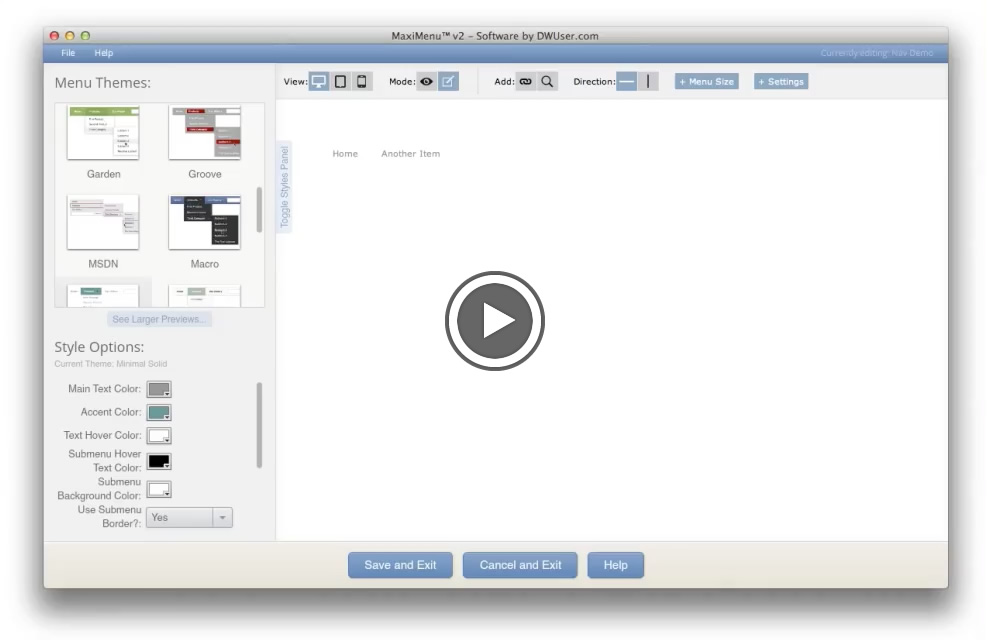
To insert a menu, you click the Insert Menu button in Dreamweaver. The wizard launches, allowing you to specify menu data using a powerful & easy-to-use interface which includes a built-in preview. Select a pre-built skin, tweak style settings as desired, and click Insert. Your menu will be inserted in the web page, ready for deployment. Making changes is just as easy.
Templates + Incredible Customization Support »
Use one of the 18 pre-built skins, or create your own using the style editor. With support for custom images, icons, colors, font styles, and visual effects, the possibilities are infinite.
Unlimited Submenus »
Working on a site with two bazillion pages? Add some order with infinite levels of submenus.
Search Engine Ready and Accessible »
All menu data is defined in HTML, so search engines can process it just like normal page links. This also means that menus meet accessibility standards and are W3C valid (X)HTML.
Impressive Flash Effects for All Users »
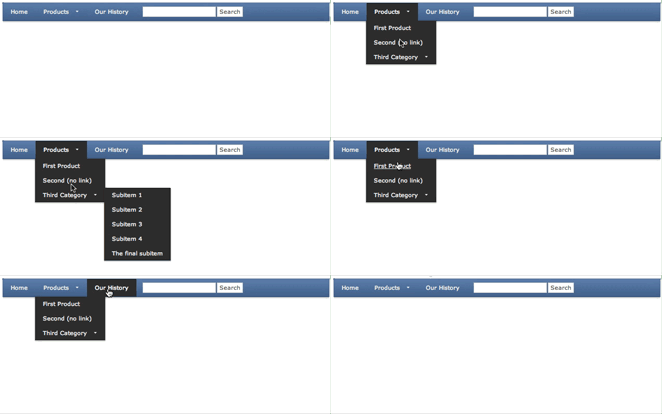
Engage your users with impressive visual effects such as blurs, fades, and slides. Thanks to Flash's ubiquity, all users will see the same effects, even if they're using an older browser. For mobile visitors, there's built-in touchscreen-optimized content.
iOS and Android Compatible »
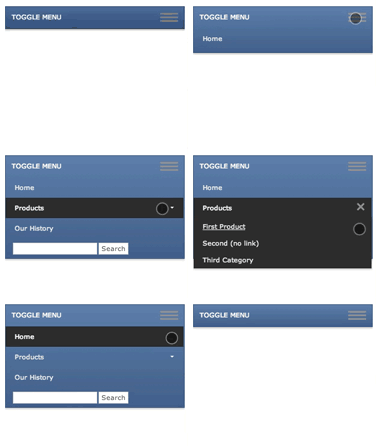
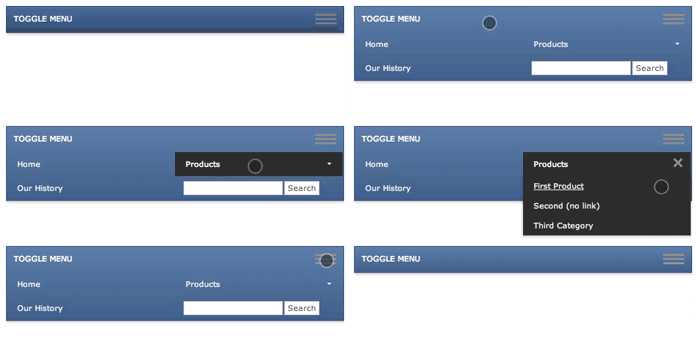
New! MaxiMenu now automatically displays a customizable, touchscreen-optimized version of your menu to users on iPhone, iPad and Android devices. Nobody's left out of the fun.
Dedicated Customer Support »
As you can see from the testimonials on the right, your purchase includes more than a download and well wishes. We're committed to helping you implement a working solution.
Free Trial »
Experience the MaxiMenu and see if it meets your needs before you buy. All features are enabled except for saving menus. Download the free trial now.
Feature Summary
- Customization - Above all else, customization is what sets the MaxiMenu apart. It can become anything you want it to become. Vertical or horizontal, full transparency, custom images, fonts1, colors, transition effects, transition speeds -- everything is customizable.
- Professional Appearance - The MaxiMenu creates website navigation which communicates a tone of professionalism
- Streamlined Development / Time Savings - The MaxiMenu is designed from the ground up to promote fast development and save time. Integration in Dreamweaver means you don't have to switch environments. Flash is not required.
- Unlimited Submenus - There is no limit to the depth of your menu, and you can even customize every level differently
- Instant WYSIWYG Preview - The edit window includes a preview panel, which shows exactly what your menu will look like
- Pre-built Templates / Skins - Get a running start on any project with the 18+ built-in skins
- Extensive Documentation - Detailed help -- in both web and PDF format -- is available for all aspects of the product
- Flash-based Display - Create an engaging user experience with cool visual effects and transitions
- Search-Engine Friendly - Menu data is HTML based, allowing for search engines to process all menu data just like normal page hyperlinks
- Browser Compatibility, Mobile Fallback - Menus are compatible with all modern browsers running the Flash Player 9 - over 99% of users. Built-in Flash Player detection ensures a positive experience for users who need to upgrade. Mobile visitors will automatically receive a non-Flash touchscreen-optimized version of the menu.
- Small Browser Footprint - Supporting files are only around 45 KB.
- Dynamic Data Ready - Menus can easily utilize external dynamic data files, allowing for instant updates
- Accessibility Compatible - By using SWFObject and HTML-based content, menus are accessibility compatible
- W3C Valid (X)HTML - The extension inserts code which is fully W3C valid
- Free Trial - Try out the software now; the trial easily converts to a full version.
1 While other features don't, the use of custom fonts does require Flash CS3 or higher.
How to Use the Extension
Visit the Support Center for comprehensive usage assistance options. Resources include a Quickstart Installation and Usage Guide and a comprehensive Usage Manual.
Requirements and Compatibility
| Platform: | |
|---|---|
| Dreamweaver Version: | |
| Flash Requirement: | The Flash Authoring Tool is NOT required to use the extension. If you're an advanced user and want to package your skins or embed custom fonts, you'll need Flash CS3 or higher. |
| Adobe AIR Runtime: | The free Adobe AIR runtime is required to run the extension's wizard. The runtime requires at least Windows 2000 or Mac OSX 10.4. |
Questions?
Purchase Now
| Price: | $ USD |
|---|---|
| License Type: | License grants a single developer the right to use the software. Extension may be used to create menus on unlimited sites. |
| Included Support Options: | |
| Safisfaction Guarantee: | In additional to a free trial version, we offer a 30-day money-back guarantee if you are at all dissatisfied with your purchase. |
|
|